

ARTICLE
Moving from Xamarin to Flutter
An actual experience of a developer moving from Xamarin to Flutter, providing analogies between the two.
THE STORY
Introduction
I have been building Xamarin.Forms apps for roughly four years at an enterprise company serving millions of users. Xamarin made development easier with their “write once, run anywhere” platform. Had we pushed to build our apps on two separate codebases, on Java and Objective C, time and costs would definitely be a concern. I’d say Xamarin was generally good for building apps, but it did have a number of headaches – build times, writing platform-specific code, lacking Hot Reload, and the lack of community-driven libraries, to mention a few. These headaches that I’ve experienced were causes for concern for me because I knew there were better and more convenient ways to build apps.
Fast forward to the time of writing, I had moved to a new company (for different reasons) where we explore the latest technologies in software development, enter Flutter! We recently had a client who requested an Android and iOS app that features navigation and augmented reality. As with every project, development time and costs are highly taken into consideration. Flutter was the perfect platform because of its similar “write once, run anywhere” approach, easy setup, well-written documentation, and wide community support! In my personal experience, it was much faster to get things done in Flutter than in Xamarin.
I’m here to share my thoughts on how Flutter was for me, coming from a four-year Xamarin background.
Learning a new language
I was super excited when I was offered this project, but when it was time to get my hands dirty, my confidence was shaken. I was good at Xamarin and C#, but knew nothing about Flutter and its programming language, Dart. I was an apprentice once again. Fortunately, Flutter’s documentation is straightforward and well-written so much so that it got me back on my feet. To my surprise, Dart is not that far off from C#!
Here’s a snippet of the simplest Dart code you can run:
Dart:
void main(List<String> arguments) {
  print('Hello world');
}
Doesn’t that look a little TOO familiar? Yep, it’s nearly identical to C#! Here’s a quick side-by-side comparison:
C#:
					using System;
public class Program
{
  public static void Main(string[] args)
  {
    Console.WriteLine("Hello world");
  }
}
Dart:
					void main(List<String> args) {
  print('Hello world');
}
Declaring classes, extending classes, writing async methods, are also a peach. Here’s a comparison on the aforementioned:
C#:
					using System;
public class Engine : CarPart
{
  public async Task<bool> DoSomething()
  {
    await SomeOtherMethod();
    return true;
  }
}
Dart:
					class Engine extends CarPart {
  Future<bool> doSomething async {
    await someOtherMethod();
    return true;
  }
}
Writing in Dart felt like home because the syntax is similar to C#. It’s not apples-to-apples though! There are concepts in Flutter that are unfamiliar for Xamarin devs. I started to notice them when I got my feet wet with building UI components.
Widgets, widgets, widgets!
Everything in your Flutter app’s UI is a Flutter widget. A Page is a widget, A View is a widget, a Layout is a widget. You get the idea!
If you’re a Xamarin developer, here’s a like for like comparison:
Xamarin (C#):
- class HomePage : Page
- class CustomButton : Button
- class CustomGridLayout : Grid
- class CustomViewComponent : View
Flutter (Dart):
- class HomePage extends StatelessWidget
- class CustomButton extends StatelessWidget
- class CustomGridLayout extends StatelessWidget
- class CustomViewComponent extends StatelessWidget
If you’ll notice, all classes in Flutter extend a StatelessWidget (or a StatefulWidget, more about that later). Whether your class is a Page or a View, they are all widgets in Flutter. Widgets require a build() implementation, where we return… another widget! Here are a few examples:
In this snippet, our CustomButton returns a button with red text
					import 'material.dart';

class CustomButton extends StatelessWidget {
  final String buttonText;

  const CustomButton(this.buttonText);

  @override Widget build(BuildContext context) { // All widgets must return a build() method
    return TextButton( // TextButton() is a widget built into Flutter
      child: Text(buttonText,
        style: TextStyle(color: Colors.red),
      ),
    );
  }
}
In this snippet, our HomePage class returns a page with an empty StackLayout as its child.
					import 'material.dart';

class HomePage extends StatelessWidget {
  @override Widget build(BuildContext context) {
    return Scaffold( // Scaffold() is a widget built into Flutter that represents a Page
      child: Column(), // Column() is similar to a StackLayout in Xamarin
    );
  }
}
If you’re wondering if you can extend a class itself, e.g. class CustomButton extends Button, this is highly discouraged in Flutter because they prefer composition over inheritance.
Flutter and State Management
One of the many reasons I enjoy coding with Flutter is that the widgets you’ll write are fairly straightforward. You are encouraged to write small, reusable, immutable components. This means lesser bugs because your code won’t have too many conditions that contribute to cyclomatic complexity. Should the need arise for your widgets to react to user interactions, for example, when your CustomButton is tapped, and we want to change it from red to green, we can swap extends from a StatelessWidget to a StatefulWidget.
So let’s assume we have a red CustomButton that extends a StatelessWidget.
					import 'material.dart';

class CustomButton extends StatelessWidget {
  final String buttonText;

  const CustomButton(this.buttonText);

  @override Widget build(BuildContext context) {
    return TextButton(
      child: Text(buttonText,
        style: TextStyle(color: Colors.red),
      ),
    );
  }
}
Now we want to change the button to a green one when tapped, so we change it to a StatefulWidget. We fire the setState() method when we want to rebuild the widget.
					import 'material.dart';

class CustomButton extends StatefulWidget {
  @override _CustomButtonState createState() => _CustomButtonState();
}

class _CustomButtonState extends State<CustomButton> {
  bool _toggle;

  @override Widget build(BuildContext context) {
    return TextButton(
      child: Text(widget.buttonText,
        style: TextStyle(
          color: _toggle ? Colors.green : Colors.red,
        ),
      ),
      onPressed: () {
        setState(() { // This setState() method redraws the widget when called
          _toggle = !_toggle; // Let’s set the _toggle boolean to its opposite value
        });
      }
    );
  }
}
That’s pretty much it! So remember, if your widget needs to change states, use a StatefulWidget. If your widget doesn’t need to change at all, use a StatelessWidget.
Pages in Xamarin are Scaffolds in Flutter
Making a new page is easy on Flutter. To compare, when making a new Page in Xamarin, you’d have a XAML file, a code behind (.xaml.cs), and you’d preferably write your business logic in a separate ViewModel class. In Flutter, all of those could be in one simple .dart file. In my experience, Flutter pages have minimal business logic. However, your mileage may vary depending on the size of the project. In Flutter, we are encouraged to write small, reusable components. Hence some of your business logic will reside in those small components.
In this snippet, we compare how pages are built in Xamarin and Flutter.
Xamarin:
					<!-- HomePage.xaml.cs -->
<ContentPage ...>
  <StackLayout>
  </StackLayout>
</ContentPage>
					public class HomePage : Page {
  // Constructor, etc.
}
					public class HomePageViewModel : ... {
  void DoSomething() { ... }
}
Flutter:
					// home_page.dart
class HomePage extends StatelessWidget {
  @override Widget build(BuildContext context) {
    return Scaffold(
      body: Column(),
    );
  }

  void doSomething() { ... }
}
Layouts in Flutter
In Xamarin, there are variations of layouts one can use. We have StackLayout, Grid, RelativeLayout, FlexLayout, and AbsoluteLayout. Each serves a unique and convenient purpose. All of these can be done in Flutter, however, I haven’t tried all of them. Here’s a reference on the ones I mostly use:
Xamarin (C#):
- StackLayout
- Grid
- RelativeLayout
- FlexLayout
- ScrollView
Flutter (Dart):
- Column, Row
- GridView
- Stack with Positioned as its children Positioned allows you to key in XY coordinates
- Flex
- ListView
Personally, I find using layouts in Flutter and Xamarin to be equal in difficulty and convenience. Xamarin’s XAML code makes it easy to picture the UI in your head, and Flutter is just as easy.
A snippet of Xamarin’s XAML code:
					<ContentView ...>
  <StackLayout>
    <Label Text"Foo" Color="Black" />
    <Label Text="Bar" Color="Green" />
    <Label Text="Baz" Color="Red" />
    <CustomButton Text="Submit" /> <!-- Add the CustomButton we made before -->
  </StackLayout>
</ContentView>
A snippet of Flutter’s Dart code:
					import 'material.dart';

class FooBarBaz extends StatelessWidget {
  @override Widget build(BuildContext context) {
    return Column(
      children: [
        Text('Foo',
          color: Colors.black,
        ),
        Text('Bar',
          color: Colors.green,
        ),
        Text('Baz',
          color: Colors.red,
        ),
        CustomButton('Submit'), // Add the CustomButton we made before
      ],
    );
  }
}
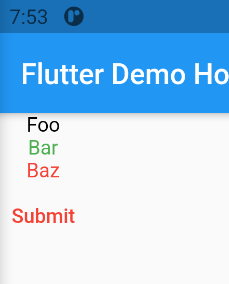
Both Xamarin and Flutter snippets will result in the following:
Updating the UI when data is fetched
Hot Reload
When I just started coding with Xamarin, I was working on a rather big codebase, and a measly code change would take 3 minutes to build and run, and to make matters worse, some of the pages I covered required a lot of tapping and navigating. Those dragging 3 minutes enticed me to look at my phone, read emails, or find any activity that would save me from boredom. Once the code had finally run, I forgot what I was doing.
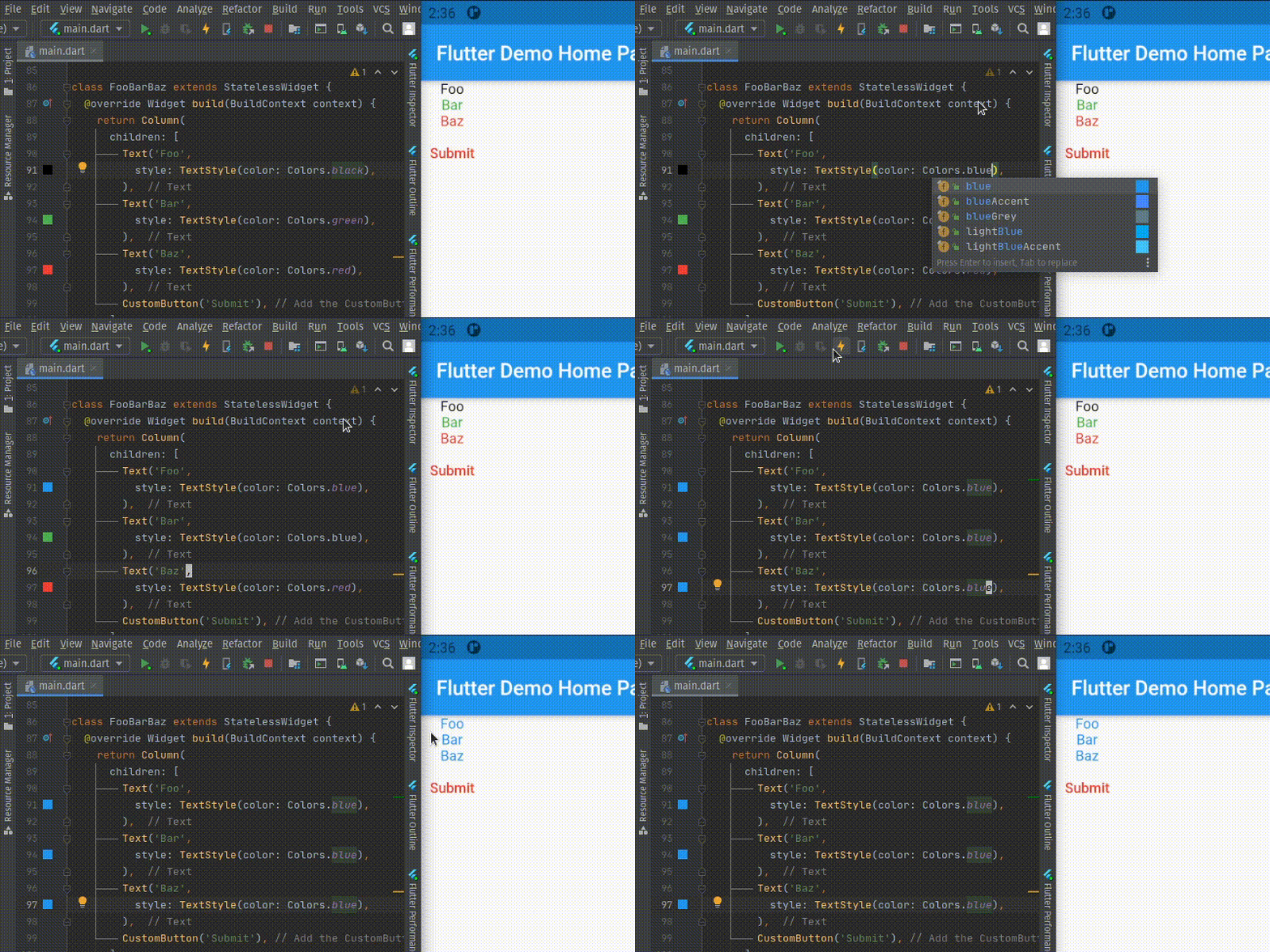
In coding, momentum is important. It could be the key factor on why you finished your task hours or days ahead of what’s expected. And to get momentum, it’s vital that you get feedback as fast as possible. This is where Hot Reload comes in. With a simple press of a keyboard shortcut, your code changes are reflected on the screen in a matter of seconds.
As of writing, Xamarin only supports Hot Reload for your XAML code. Your business logic and pretty much the rest of your code, you’ll need to rebuild and redeploy. This might not be relevant for some, but personally, it makes a big difference, as other mobile platforms have done Hot Reload better.
In Flutter, Hot Reload will work on most of your code (UI and business logic included), and you will remain on the same screen you left with, so you won’t have to tap and navigate again. This is one of the many reasons why I enjoyed Flutter. Because the feedback is fast, I’m still in the right mindset to act on what changes are needed to get the job done.
Codesharing
One strength of Xamarin is that your code is written using C#, and the beauty of that is you can package your classes into Views, ViewModels, Models, DataServices (fetches data from API), and more. Coming from an enterprise company, we definitely took advantage of that. Packaging your classes allows you to reuse your models and data services independent from the platform it’s built for, be it Xamarin, ASP.NET, UWP, WPF, Windows Forms, macOS, or Linux. So your C# mobile app, web app, and native app can share the same models and the same methods to fetch data.
As Flutter and Dart are still young (or let’s just say that C# is old), this level of code reusability is less desirable than in C#. At the time of writing, Flutter is in the works of adding full support for web and desktop (Windows, macOS, Linux) apps whereas Xamarin is ahead in terms of support for the mentioned platforms.
Another scene to consider in sharing code is if, say, you want to build a base Point of Sale mobile app to sell to restaurants. It will have common features that a PoS app requires, but it’s expected that your client restaurants will request custom features and themes. I’d say both Xamarin and Flutter will fit this need.
Popularity and Libraries
Conclusion
I wrote this article as a first-hand source of what Flutter was like for a four-year Xamarin developer. I wanted to share the migration process, its strengths, and its weaknesses. Flutter has surely rekindled my love for programming. It was an absolute delight.
It only took me a few days to get familiar with it, because the syntax between C# and Dart are similar. Moreover, as I kept writing in Flutter, I understood the value of state management and immutability. I’d say Dart is more encouraging in this aspect than C#, and will definitely reduce bug counts in the long run.
If I were to write a new mobile app, I would still consider both because they have their pros and cons. Here’s my take on which platform to choose when starting on a new mobile app:
Consider Flutter if:
- you want faster mobile development.
- Hot Reload is important.
- you’ll take advantage of open source libraries for your UI (and maybe even non-UI).
- you’re looking into using trendy technologies that will hopefully grow into an industry standard.
- you’ll need to bind native code (in my experience, it’s easier in Flutter).
Consider Xamarin if:
- you are building a large app that requires a lot of devs (C# devs are easier to find).
- C# is the team’s primary language.
- you need to share code among different platforms (UWP, ASP.NET, macOS, Linux, etc.).
- programming language’s lifespan is important (C# is sure to stay for long and is attractive to enterprises, banks, and the like).
- you cannot risk being early adopters (Flutter is relatively new).
Thanks for taking time to read this article!
